

Cart Statuses
What moves a cart between Shopping, Abandoned, Recovered, Ordered and Lost, including the less obvious paths: a shopper who comes back after an email, a second abandonment, a restart and a refund.
Every cart ShapedRecover stores is in exactly one of five statuses. If you haven't met them yet, start with the statuses table in How Recovery Works: it says what each one means in a sentence. This page is the detailed reference: every way a cart can move, plus the edge cases store owners ask about.
Every way a cart can move
| From | To | What causes it |
|---|---|---|
| (not stored) | Shopping | The shopper types a valid email at checkout and keeps the consent box ticked (a consented, logged-in customer is captured as soon as the cart has an item). See How Recovery Works. |
| Shopping | Abandoned (Recoverable) | No activity for the abandonment cutoff (15 minutes by default) and no order. |
| Abandoned | Shopping | New activity: the shopper changes their cart or their email. See Coming back after an email. |
| Shopping or Abandoned | Recovered | A paid order placed through the recovery link, within 14 days of the email that carried it. |
| Shopping or Abandoned | Ordered | The shopper places an order without the recovery link. |
| Abandoned | Lost | The lost cutoff (30 days by default) passes with no order, or you choose Mark as Lost. |
| Lost | Abandoned (Recoverable) | You choose Restart Recovery. See Restarting a lost cart. |
| Lost | Recovered | The shopper places an order through a recovery link within 14 days of that email, and it's paid, even though the cart was already marked lost. |
| Recovered | Ordered | The recovered order is later fully refunded or cancelled. See Refunds and cancellations. |
A few words used above:
- Activity is any change to the cart or the shopper's email: adding or removing an item, changing a quantity, retyping the address. Just looking at the shop isn't activity.
- The abandonment cutoff and the lost cutoff are set in Settings → General as Mark Cart as Abandoned After and Mark Cart as Lost After. See General Settings.
- Status changes driven by the clock are applied by a background job that runs every 5 minutes, so a cart can show its new status up to 5 minutes late. Email send times always count from the real moment, not from when the job noticed. See Requirements.
Coming back before any email
If a Recoverable cart sees new activity before its first email goes out, it goes back to Shopping and its scheduled emails are cancelled. When the shopper leaves again, the cart is abandoned again and the emails are scheduled afresh, counted from the new abandonment.
From the shopper's side nothing happened: they never got an email, and the sequence simply starts later.
Coming back after an email
This is the case people ask about most. Say you have three active campaigns at 1 hour, 1 day and 2 days. Maya gets the 1-hour email, clicks through, changes her cart, and leaves again without paying.
- Her change is activity, so the cart goes back to Shopping. Her scheduled emails are cancelled for now.
- 15 minutes later, with no order, the cart is Abandoned again. That's its second abandonment.
- The emails that haven't reached her yet are scheduled from the new abandonment: the 1-day email 1 day later, the 2-day email 2 days later.
- The 1-hour email is not sent again. Each campaign emails a cart once at most, however many times it's abandoned.
A recovery visit that changes the cart counts as activity too. So does a coupon the email applied automatically when the cart was restored. That's why a shopper who clicks through and then wanders off still gets the rest of the sequence, spaced out from when they actually left.
One more rule keeps the sequence in order: once a cart has received a later email, an earlier one it never got is never sent after it. Say you switch on a new 30-minute campaign after Maya already had the 1-day email. On her next abandonment, the 30-minute email is skipped as overdue instead of arriving out of order. You'll see it in the drawer's timeline as Skipped with Not sent: overdue.
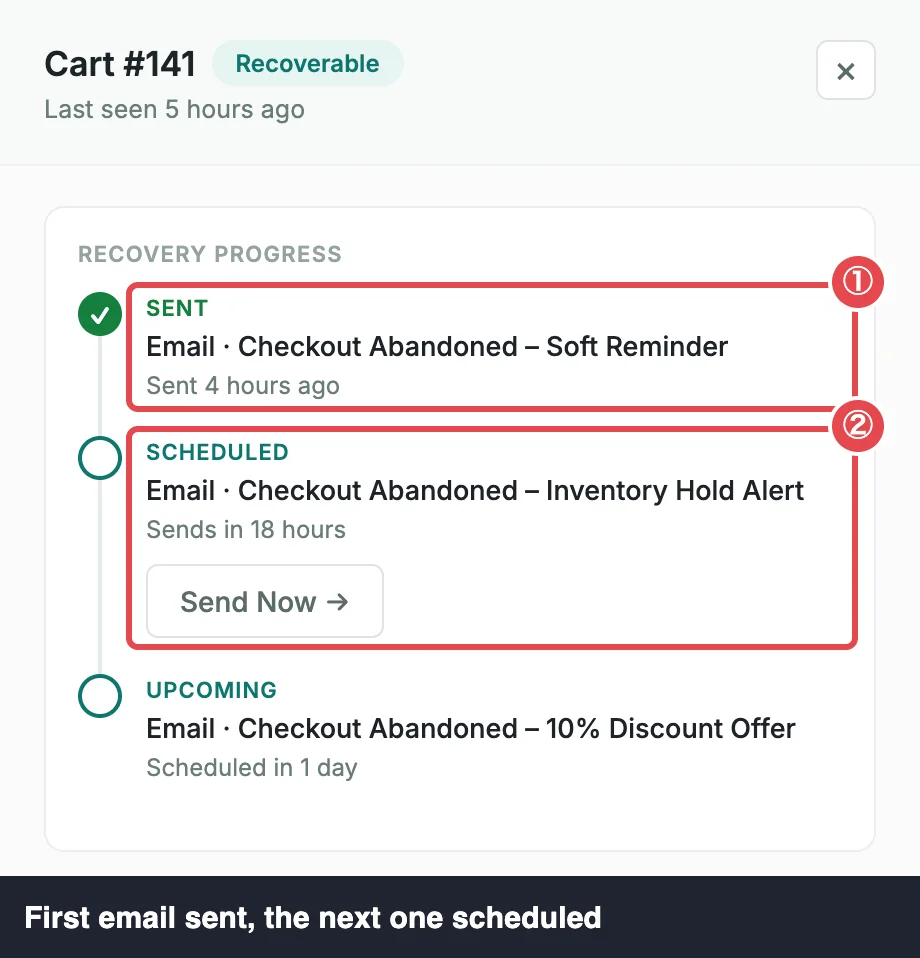 ① Sent · ② Scheduled
Counted once in your reports
A cart that's abandoned twice isn't counted twice. The Dashboard and Reports count each cart once, by the time it first became abandoned and its value at that moment. A return, a changed cart or a second abandonment never moves it to another date or lowers the amount. See KPIs & Chart.
Orders stop the emails
Any order from the shopper stops the cart's emails at once: same email address or same customer account, any order status, any device. Where the cart goes next depends on how the order was placed.
- Through the recovery link, placed within 14 days of that email and then paid: the cart becomes Recovered and the sale is credited. Payment itself can come later. See How Recovery Works.
- Without the recovery link, for example the shopper typed your address into their browser: the cart closes as Ordered. The sale happened, so no more reminders go out, but it isn't credited as a recovery, and it isn't counted as lost either.
Waiting for payment
An order through the recovery link that isn't paid yet (a bank transfer or cheque on hold, for example) doesn't close the cart. It stays Recoverable or Shopping, and the Recovery Stage reads Order #1234 · awaiting payment. While it waits:
- no more emails go to the shopper,
- the lost cutoff never marks it lost,
- it can't be deleted, marked as lost or stopped from tracking, so the sale can still be credited once it's paid.
When the order reaches a paid status, the cart becomes Recovered. If the order is cancelled or fails instead, the cart closes as Ordered.
Refunds and cancellations
If a recovered order is later fully refunded or cancelled, the cart moves from Recovered to Ordered. An order did happen, but it's no longer credited, so it drops out of your recovered revenue. In the drawer's timeline the order event reads Refunded or cancelled — no longer credited.
A partial refund doesn't change the status. The cart stays Recovered, and Reports count the order's total minus the refunded amount. See Recovered Sales.
Lost, and marking a cart lost yourself
A Recoverable cart becomes Lost when the lost cutoff passes with no order. Its remaining emails are skipped and its recovery is over. You can also end a cart early with Mark as Lost in the bulk bar, for example when the shopper has told you they're not buying. Only Recoverable carts can be marked lost; a cart waiting for payment is left as it is.
A Lost cart isn't completely closed to a sale. If the shopper later orders through a recovery link within 14 days of that email, and the order is paid, the cart becomes Recovered and the sale is credited.
Restarting a lost cart
Restart Recovery in the bulk bar gives a Lost cart another chance. Here's exactly what happens:
- The cart is Recoverable again, and not paused.
- The emails its loss cancelled, the ones it hadn't received yet, are scheduled again in their original order. The first is due straight away and goes out within about 5 minutes; the rest keep their original spacing after it.
- The lost cutoff counts again from the restart, not from the original abandonment. So a cart abandoned 40 days ago and restarted today stays Recoverable for another 30 days (with the default cutoff), then becomes Lost again if there's still no order.
- Its abandonment date doesn't change, so the restart doesn't count it as a newly abandoned cart in your Dashboard or Reports.
- If every email had already been sent before it was lost, nothing is scheduled. The cart sits as Recoverable until the lost cutoff ends it again.
A restart is refused when the shopper already has another open cart (same email address or same account). That usually means they came back and started a newer cart, which has its own emails. Restarting the old one would send them two streams of reminders, so it stays Lost and the toast says skipped (shopper has a newer cart).
New activity or a new abandonment after a restart works the normal way: the cutoffs count from the new abandonment.
Paused is not a status
Pausing a cart's emails, from the drawer or with Pause Emails in the bulk bar, doesn't change its status. A paused cart stays Recoverable, and its Recovery Stage reads Paused · emails on hold. Its emails keep their send times but don't go out until you resume. See Cart Drawer.
One shopper, two open carts
ShapedRecover continues a shopper's existing open cart only when it's sure the cart is theirs: it was started in the same browser session, or it belongs to the customer account they're logged in with. An email address alone isn't proof, because anyone can type any address at a checkout. So a cart is never taken over, emptied or silenced just because someone else typed the same email.
The trade-off is that the same shopper can sometimes end up with two open carts with the same email:
- a guest who comes back later in a new browser session,
- a customer who logged out and checked out as a guest,
- a customer who started a cart as a guest in an earlier visit or on another device, then logged in. (Logging in during the same visit keeps one cart: WooCommerce carries the guest's session over to the account.)
Each cart gets its own emails. When the shopper places an order, both carts stop: the order matches them by email or account. If they never order, each one becomes Lost on its own schedule. A shopper who comes back through a recovery link continues the original cart while it's still open (Shopping or Recoverable), since the link puts that cart back in their session.
When a cart disappears
A cart can leave the table without changing status:
- The shopper unticks the consent box. The stored cart is deleted at once. See Consent Checkbox.
- The shopper empties their cart. An empty cart has nothing to recover, so the stored cart is deleted.
- You choose Delete or Stop Tracking. See Bulk Actions.
- The address is on your Never Track list (Pro). A matching cart is deleted and never captured again. See Exclusions.
- The retention period passes. Closed carts (Recovered, Ordered and Lost) older than your Recoverable Carts period are removed by a daily cleanup. Recovered carts are anonymised instead of deleted, so your recovered sales stay complete. See Data & Storage.
Pro
The Never Track list is a ShapedRecover Pro feature. In the free plugin it shows with a Pro badge. See Free vs Pro.
Where to go next
- Carts Table: see every cart's status and Recovery Stage.
- Bulk Actions: mark carts lost, restart them, or pause their emails.
- Attribution & Audit: exactly when an order counts as recovered.
- General Settings: change the abandonment and lost cutoffs.