

Introduction
Meet ShapedRecover: what it does for your WooCommerce store, and how these docs help you get recovery running.
Plenty of shoppers get as far as your checkout, type in their email address, and then leave without paying. Maybe the phone rang, maybe they were comparing prices, maybe shipping cost more than they expected. Most of them aren't gone for good. They just need a nudge.
ShapedRecover gives them that nudge for you. It's a WooCommerce plugin that notices when a shopper leaves a cart behind and sends them a short series of recovery emails at times you choose. One click brings them straight back to checkout with their cart already filled in. If you want, each email can carry a personal coupon, which can apply itself when they return.
Then it tells you what that was worth: revenue it actually brought back, counted strictly enough that you can trust the number.
What it does
Here's the whole idea in four steps:
- It captures the cart. When a shopper types their email at checkout (and leaves the consent box ticked), ShapedRecover saves their email and what's in their cart. Logged-in customers who've agreed before are tracked from the moment they add something to the cart.
- It waits. If there's no order after a set time (15 minutes, unless you change it), the cart counts as abandoned.
- It sends your emails. Each active campaign is one email, sent a set time after the cart was abandoned: say, a friendly reminder after 1 hour, a "your items are waiting" email after 1 day, and a 10% coupon after 2 days.
- It credits the recovery. When the shopper clicks the link in an email and pays, the order counts as recovered, and the rest of the emails stop.
How Recovery Works follows one cart through every step, including what happens when a shopper buys without clicking the link or never comes back.
What you get
- Cart tracking on both checkouts. Works on WooCommerce's block checkout and the classic shortcode checkout, for guests and logged-in customers. See Email Capture.
- An Abandoned carts table with statuses, search, filters, bulk actions and a drawer showing each cart's timeline. See Carts Table.
- Recovery campaigns you can switch on and off, with three ready-made templates and an email editor with merge tags (placeholders like the shopper's first name), timing, a product table and test sends. See Campaign List.
- Personal coupons generated for each shopper, applied automatically when they come back if you turn on Auto Apply, and cleaned up afterwards. See Coupons in Emails.
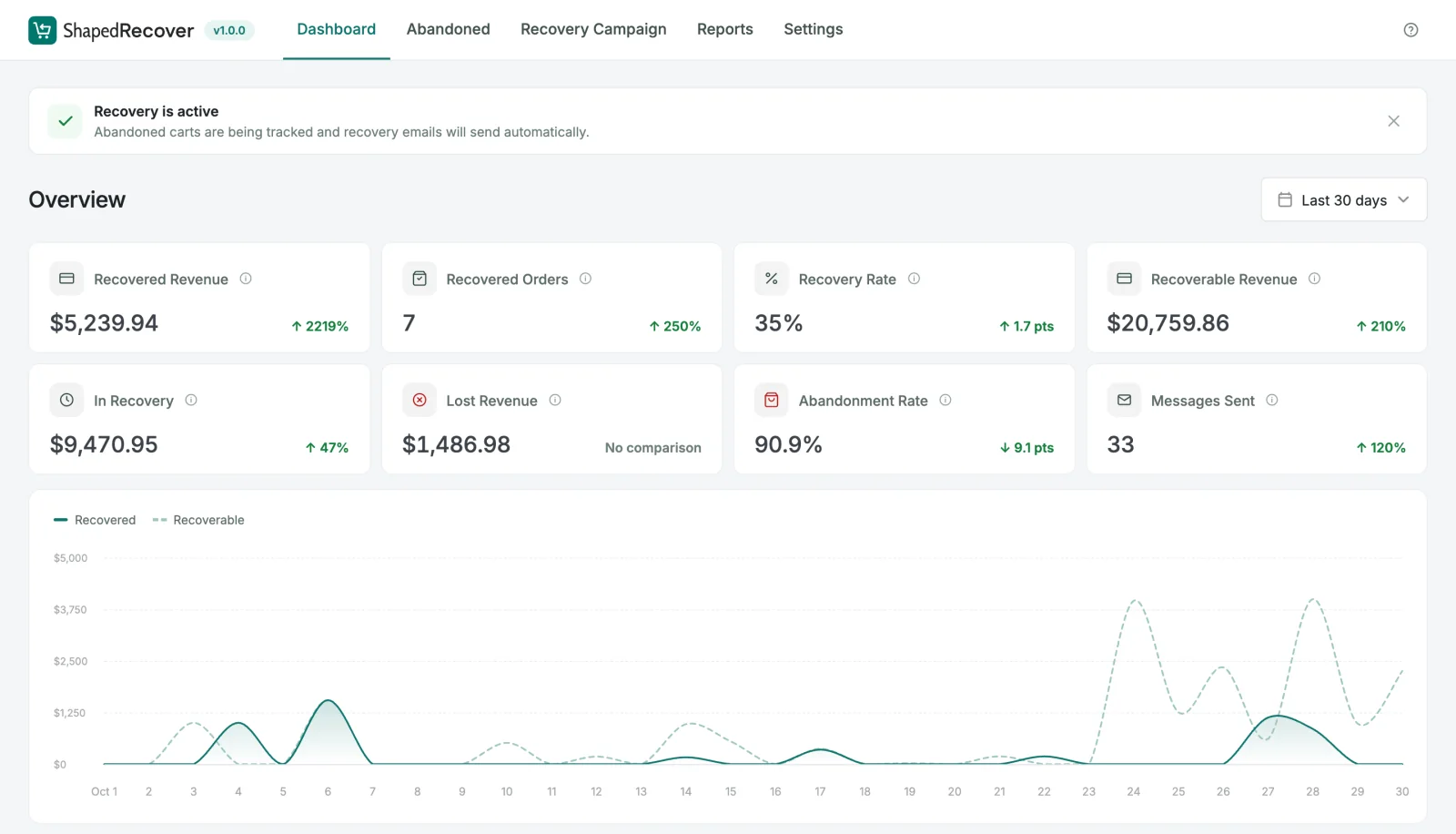
- A Dashboard with recovered revenue, recovery rate, carts still in recovery, lost revenue and more, for any date range. See Dashboard Overview.
- A Recovered Sales report listing every credited order, with an audit that shows exactly why each one counted. See Recovered Sales.
- Privacy tools built in: a consent checkbox at checkout, an unsubscribe link in every email, retention limits, and support for WordPress's personal data export and erase tools. See Unsubscribe & Privacy.
What makes it different
Recovered means recovered. Many recovery tools count any order from a shopper they emailed as a win, even if that shopper came back on their own. ShapedRecover only credits an order that came back through the recovery link, within 14 days of the email, and was actually paid. Orders that only share an email address don't count. Your recovered revenue number is lower than an inflated one would be, but you can believe it. Attribution & Audit explains the rule.
Setup takes minutes. A four-step checklist on the Dashboard walks you through turning tracking on, saving your sender details, switching on a campaign and sending yourself a test. See Quick Start.
Privacy isn't an add-on. Shoppers who untick the consent box aren't tracked at all, and anyone can unsubscribe from the email itself.
Free and Pro
ShapedRecover comes as two plugins:
- ShapedRecover (free) runs the whole recovery loop: capture, the Abandoned table, campaigns and templates, the editor, personal coupons and cleanup, the Dashboard, Recovered Sales, consent, unsubscribe and data retention.
- ShapedRecover Pro is an add-on that sits on top of the free plugin and unlocks a few extras:
| Pro feature | What it adds |
|---|---|
| Admin notifications | An email digest of recoveries and new abandoned carts. |
| Never Track list | Addresses (your staff, your test accounts) that are never tracked. |
| Coupon restrictions | Stop recovery coupons combining with other coupons or applying to sale items. |
| Exclude Products | Leave chosen products out of a recovery coupon. |
| Product Report | A Dashboard card listing your five most abandoned products, and how often each one was recovered. |
| License | The key that unlocks Pro, with updates and support. |
In the free plugin, these show with a Pro badge so you can see what they do. Free vs Pro has the details.
How these docs are organised
- Getting Started (you're here): requirements, installation, how recovery works, and a quick start.
- Guides: step-by-step walkthroughs, like setting up reliable email sending and building your first campaign.
- Dashboard, Abandoned Carts, Recovery Campaigns, Reports, Settings: one section per tab in the plugin, in the same order you'll see them.
- Coupons and Tracking & Privacy: how those features behave, wherever their settings live.
- Help: FAQ, Troubleshooting and a Glossary of the terms used here.
- Developers: hooks and functions for customising the plugin in code.
Where to go next
- Requirements: check your site is ready.
- Installation & License: install the plugin.
- Quick Start: get recovery running.