

Triggers & Timing
Choose which carts a campaign emails and how long after abandonment it sends.
Every campaign answers two questions: which abandoned carts should get this email, and when. You set both in the Email Editor, just under the body.
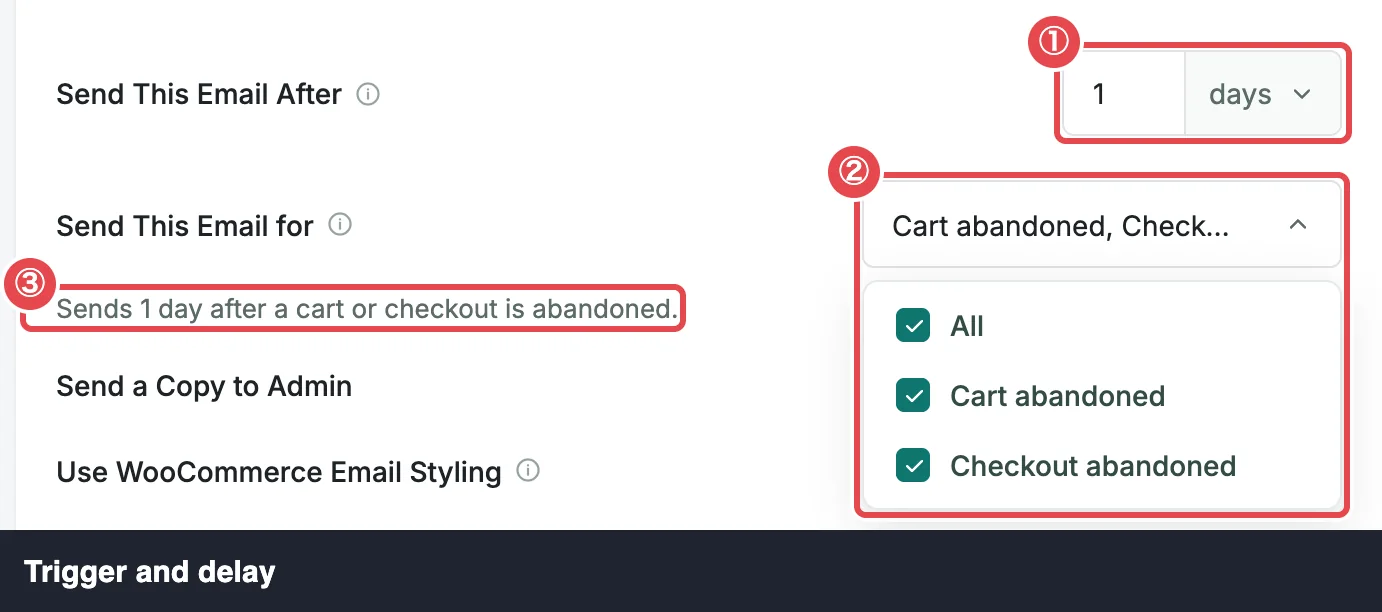
Send This Email for: the trigger
A trigger is the kind of abandonment that starts a campaign. ShapedRecover has two:
| Trigger | Which carts |
|---|---|
| Checkout abandoned | The shopper reached your checkout, typed their email, and left. This covers every guest and most carts. |
| Cart abandoned | A logged-in customer left items in their cart without ever visiting the checkout. |
Every captured cart has exactly one of the two. Email Capture explains how each kind is captured.
In Send This Email for, tick one or both. All ticks both. A campaign needs at least one trigger. With none, the sentence under the fields reads Select at least one abandonment type for this email to send., and saving is refused with Choose at least one trigger.
Which should I pick?
Start with Checkout abandoned; it's where most of your recoverable carts are. Add Cart abandoned if many of your shoppers have accounts and browse while logged in. A campaign with both triggers reaches both kinds of cart with the same email.
Send This Email After: the delay
The delay is how long to wait after the cart becomes abandoned before this email sends. Enter a whole number and pick minutes, hours or days.
| Setting | Range | Default |
|---|---|---|
| Send This Email After | 5 minutes to 90 days, whole numbers | 1 hour for a blank campaign |
Outside that range the save is refused with Send after a whole number from 5 minutes to 90 days.
The clock starts when the cart becomes Abandoned, not when the shopper last typed. A cart becomes abandoned after 15 minutes with no activity by default, so a 1-hour delay reaches the shopper roughly an hour and a quarter after they left. See How Recovery Works.
The live sentence
Under the two fields, a sentence says in plain words what you've set up, and updates as you change them:
- Sends 1 hour after checkout is abandoned.
- Sends 2 days after a cart is abandoned.
- Sends 1 day after a cart or checkout is abandoned.
Read it before saving. It's the quickest way to catch "1 day" typed as "1 hour".
How a cart's emails line up
You don't build sequences separately. A cart's sequence is simply every active campaign whose trigger matches the cart, sent in order of delay.
Say you have two active Checkout abandoned campaigns, one at 1 hour and one at 1 day, and a checkout is abandoned at 10:00:
| Due | |
|---|---|
| The 1-hour campaign | 11:00 the same day |
| The 1-day campaign | 10:00 the next day |
The sequence stops early if the shopper orders, unsubscribes, or the cart is marked lost. Each campaign emails a cart once at most, even if that cart is abandoned again later. The limit is per cart, not per shopper: if the same shopper starts a new cart later (after an order, say, or in a new visit), that cart gets the whole sequence again, coupon email included.
An earlier email never arrives after a later one. If something delays the 1-hour email past the moment the 1-day email went out, the 1-hour email is skipped. See How Sending Works.
No two active campaigns at the same time
Two active campaigns for the same trigger can't share a delay; otherwise the shopper would get two emails at once. Switching on the second, or saving it while it's on, is refused:
Another active campaign for Checkout abandoned already sends at 1 hour.
Delays are compared as real time, so 24 hours and 1 day clash. A Checkout abandoned campaign and a Cart abandoned campaign can share a delay, since a cart only ever has one trigger. A campaign with both triggers clashes with either.
The lost cutoff
A cart that's still not ordered after Mark Cart as Lost After (30 days by default) becomes Lost, and gets no more emails. So a campaign has to send at least a day before that cutoff. One that wouldn't is refused when you switch it on:
This campaign sends at 30 days, after carts are marked lost. Increase "Mark Cart as Lost After" to at least 31 days to turn it on.
With the default 30-day cutoff, your longest delay can be 29 days. For a longer win-back email, raise the cutoff in General Settings first. The same rule works the other way: you can't lower the cutoff below your slowest active campaign's delay plus a day.
The lost cutoff also can't be longer than how long carts are kept (Recoverable Carts in Data & Storage). Until you save Recoverable Carts yourself, it follows the lost cutoff automatically, so raising the cutoff just works. Only if you've saved a retention period shorter than the cutoff you want do you need to raise it first.
Campaigns switched on later
Turn on a campaign today and it doesn't only wait for new carts. ShapedRecover also schedules it for carts that are already abandoned, as if the campaign had been on when they were abandoned. The same happens when you save changes to a campaign that's on.
A waiting cart gets the email when all of these are true:
- it's Abandoned (Recoverable), with no order and no order awaiting payment;
- it has one of the campaign's triggers;
- it hasn't had an email from this campaign yet, scheduled, sent or skipped;
- its send time, the moment it was abandoned plus the delay, is still ahead;
- no later email in its sequence has already gone out, or is due, before that time.
A cart whose send time has already passed gets nothing from the campaign. Switching on a campaign never fires off a pile of overdue emails.
An example. A checkout is abandoned at 10:00 while no campaign is on.
- At 10:30 you switch on a 1-hour Checkout abandoned campaign. The cart's email is scheduled for 11:00, exactly as if the campaign had been on all along.
- If you'd switched it on at 12:00 instead, 11:00 has passed, so this cart gets no email from it.
The list confirms how many carts it reached, for example Also scheduled for 3 carts already abandoned. See Campaign List.
A few more details:
- Restarted carts. If you restarted recovery on a lost cart, its send time counts from the restart, not the original abandonment. See Bulk Actions.
- Paused carts are scheduled too, but the email waits until you resume the cart.
- Switching off and on again, or saving again, never gives a cart a second email from the same campaign.
Editing a delay doesn't move scheduled emails
Send times are fixed when a cart's email is scheduled. If you change the delay or trigger of a campaign that's switched on:
- Emails already scheduled keep their original send time and their original carts.
- Carts abandoned from now on use the new delay and trigger.
- Waiting carts that had nothing from this campaign yet are scheduled with the new settings, if that send time is still ahead.
So moving a campaign from 1 day to 2 days takes effect gradually, as new carts come in. Changes to the wording, by contrast, reach every unsent email straight away.
Where to go next
- Campaign List: switch campaigns on and see them in send order.
- How Sending Works: what's checked right before each email goes out.
- Build a Discount Sequence: plan delays for a reminder-then-discount series.
- Cart Statuses: when a cart is abandoned, lost or ordered.