

Consent Checkbox
The opt-in box at checkout: what shoppers see, and what happens when they untick it.
ShapedRecover only saves a cart, and only emails a shopper, when they've agreed to it. That agreement is a single checkbox at checkout. This page covers what it says, how it behaves for guests and customers, and what it records, so you can answer a shopper's or a regulator's questions.
What shoppers see
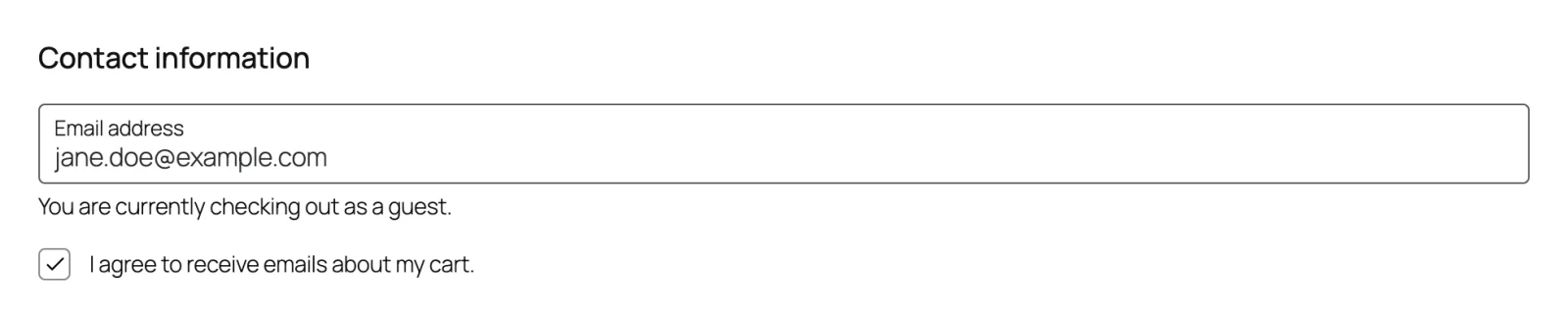
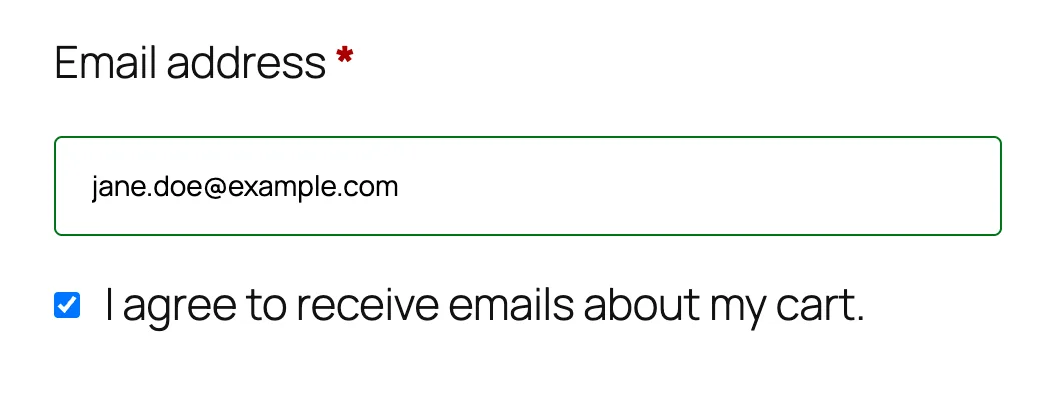
A checkbox with this label, followed by a link to your privacy policy:
☑ I agree to receive emails about my cart. See our privacy policy.
- On the block checkout, it's the Cart Reminder Consent block, in the contact information section next to the email field. WooCommerce places it there for you. In the page editor it's locked, so it can't be deleted by accident, and shows a preview of the box.
- On the classic checkout, it sits right under the billing email field.
The See our privacy policy. link opens your WordPress privacy page in a new tab. It only appears when you've chosen a privacy page in Settings → Privacy and that page is published. A draft privacy page shows no link.
The box only appears while Abandoned Tracking is on. With tracking off, shoppers don't see it at all.
Ticked by default
The box starts ticked. Opening the checkout with it ticked counts as consent, so the shopper doesn't have to do anything. As soon as they type a valid email, their cart is saved. See Email Capture.
It starts unticked only when the shopper has already said no: they unticked it earlier in the same visit, or, for a logged-in customer, at any time on their account.
The box is not required to place an order. A shopper who unticks it checks out exactly as normal; you just won't be able to remind them about a cart.
Selling into the EU or UK?
A pre-ticked box may not count as valid consent under the GDPR. The EU's Court of Justice ruled that a pre-ticked box isn't valid consent in Planet49 (2019), a case about cookies. If your shoppers are in the EU or UK, ask your legal adviser whether the default fits your store, and make sure your privacy policy explains cart reminders.
Unticking the box
Unticking takes effect straight away:
- Anything already saved is deleted at once: the cart record, and any reminder emails scheduled for it.
- Nothing more is saved for the rest of the visit, even if they change their cart or email.
- The box stays unticked when they come back to the checkout during that visit.
If they change their mind and tick it again, that's fresh consent, and their cart is saved again.
A cart whose order is already in progress isn't deleted by an untick. At that point it belongs to the order.
Guests and logged-in customers
| Guest | Logged-in customer | |
|---|---|---|
| Consent covers | This cart, this visit only. | Their account, until they withdraw it. |
| Next visit | The box shows again, ticked. | Their carts are tracked from the moment they add an item, without asking again. |
| After unticking | Unticked for the rest of this visit. A later visit starts fresh. | A "no" is saved on the account. The box stays unticked on every later visit until they tick it. |
| After unsubscribing | They're never emailed again. | Their saved consent is withdrawn and they're never emailed again. |
A customer who unsubscribed and later reaches the checkout with the box ticked has their consent saved again, but their emails are still skipped, because their address stays unsubscribed. See Unsubscribe & Privacy.
Users with an excluded role (Administrator and Shop Manager by default) see the box like anyone else, but nothing is saved for them. See Exclusions.
Recovery visits hide the box
When a shopper comes back through the link in a recovery email, they don't see the box for the rest of that visit, on either checkout. They already agreed to emails about this cart, and the link carries that agreement with it. Showing the box again would invite them to untick it, which would delete the very cart their order is being credited to.
Withdrawing is still one click away: every email has an unsubscribe link.
There's one exception. If the shopper unticked the box earlier in the same visit, or has a "no" saved on their account, that stands: the box shows, unticked, as usual.
What's recorded
Every saved cart keeps a record of the consent behind it:
- when it was given,
- the exact label the shopper saw, so a later change to your wording doesn't rewrite history,
- where: the classic or block checkout.
You'll find the date in the cart's drawer on the Abandoned tab, as Consent: Given followed by the date. See Cart Drawer. The full record is also part of WordPress's personal data export. See Unsubscribe & Privacy.
Note what this means: because the box starts ticked, a recorded consent means "saw the box ticked and left it", not "actively ticked it".
Change the label
You can reword the checkbox in Settings → GDPR Consent → Consent Checkbox Label. It's the only setting in that section.
| Field | What it does | Default |
|---|---|---|
| Consent Checkbox Label | The text beside the checkout checkbox. 1 to 200 characters. The privacy policy link is added after it automatically. | I agree to receive emails about my cart. |
Keep it short and plain, and say what the shopper is agreeing to: for example, "Email me a reminder if I don't finish my order." New consents record the new wording; carts already saved keep the label their shopper saw. See GDPR Consent.

What the checkbox doesn't do
To keep checkout clean, ShapedRecover doesn't add anything else to it:
- There's no separate consent notice or banner at checkout. The checkbox and its label are the whole notice, so make sure your privacy policy covers cart reminders.
- There's no "Don't save my cart" link. Unticking the box does that job.
Where to go next
- Email Capture: what's saved once a shopper consents.
- Unsubscribe & Privacy: unsubscribing, data export and erasure.
- GDPR Consent: the settings section.