

Requirements
What your site needs before you install ShapedRecover: WordPress, PHP, WooCommerce, background jobs and working email.
ShapedRecover runs inside WooCommerce, so most of what it needs your store already has. The two things worth checking before you start are background jobs and email. Recovery depends on both, and neither shows an error on your storefront when it isn't working.
At a glance
| Requirement | Minimum | How to check |
|---|---|---|
| WordPress | 6.6 | Dashboard → Updates |
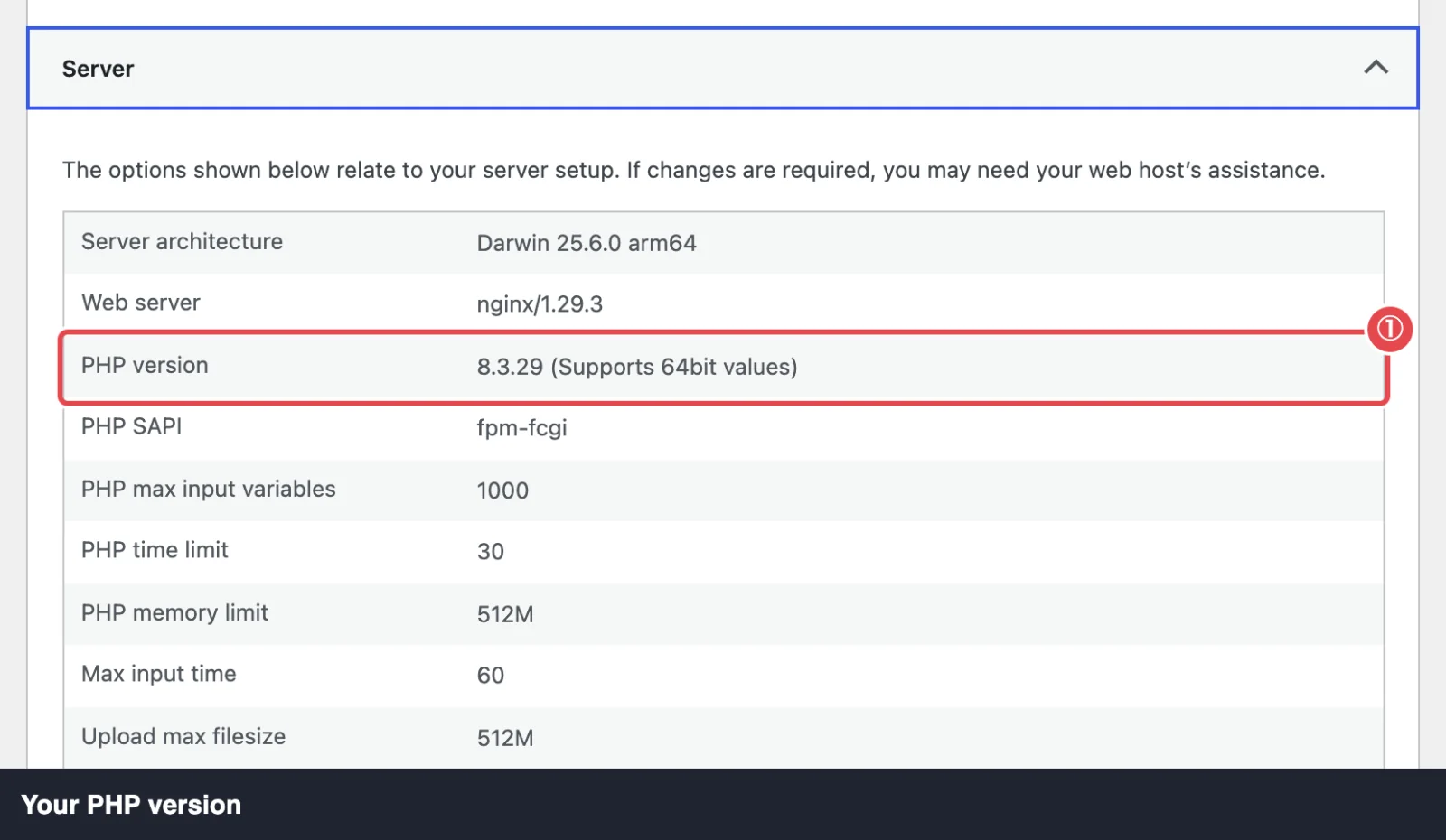
| PHP | 7.4 | Tools → Site Health → Info → Server |
| WooCommerce | 8.3 | Plugins screen |
| Background jobs | WP-Cron running, or a server cron job | WooCommerce → Status → Scheduled Actions |
| Your site can send email | ShapedRecover → Settings → Sending → Send Test Email |
ShapedRecover Pro needs the same, plus the free plugin (Shaped Recover on the Plugins screen) installed and active.
WordPress, PHP and WooCommerce
You need WordPress 6.6 or newer, PHP 7.4 or newer and WooCommerce 8.3 or newer. ShapedRecover is tested with current versions of all three.
ShapedRecover declares WooCommerce as a required plugin, so WordPress won't let you activate it until WooCommerce is installed and active, and won't let you deactivate WooCommerce while ShapedRecover is on.
If WooCommerce goes missing some other way (deleted over FTP, say) or is older than 8.3, ShapedRecover doesn't break your site. It shows an admin notice and waits. As soon as WooCommerce is back or updated, ShapedRecover starts working on the next page load, with nothing else for you to do.
Checkouts
Both WooCommerce checkouts are supported:
- The block checkout, the default on new stores since WooCommerce 8.3.
- The classic checkout, the
[woocommerce_checkout]shortcode.
The consent checkbox and email capture work on either. You don't need to change anything.
High-Performance Order Storage
ShapedRecover is compatible with WooCommerce's High-Performance Order Storage (HPOS) and with the older posts-based order storage. It works the same way on both.
Background jobs
Recovery happens on a timer: a cart becomes abandoned 15 minutes after the shopper's last activity, and each email goes out hours or days later. ShapedRecover runs that timer with Action Scheduler, the job runner that ships inside WooCommerce, so there's nothing extra to install.
Two jobs keep everything moving:
- A sweep every 5 minutes, which updates cart statuses and sends any emails that are due.
- A daily job at 03:00 your site's time, which does housekeeping such as coupon cleanup and removing old records.
Action Scheduler is started by WP-Cron, and WP-Cron only runs when someone visits your site. On a busy store that's fine. On a quiet one, or a site where WP-Cron is switched off (DISABLE_WP_CRON), jobs can run late, and so can your recovery emails.
If the sweep falls more than 15 minutes behind while tracking is on, every ShapedRecover tab shows a warning: "Background jobs are running late…". The fix is a real server cron job that triggers WP-Cron every few minutes. Most hosts let you add one from their control panel. Set Up SMTP covers this step too.
See the jobs yourself
Go to WooCommerce → Status → Scheduled Actions and search for shaped_recover. You should see one pending sweep and one pending daily job.
Email that actually arrives
ShapedRecover sends emails through WordPress's normal mail function, the same way WooCommerce sends order emails. Out of the box, many hosts deliver those emails poorly or not at all, and they often land in spam.
ShapedRecover doesn't need any particular mail plugin, but you'll get far better results by sending through a proper email service with an SMTP plugin. If your WooCommerce order emails already arrive reliably, your recovery emails will too.
To check, go to ShapedRecover → Settings → Sending and use Send Test Email. If it fails, or the message doesn't reach your inbox, follow Set Up SMTP before you switch on any campaigns.
Multisite
On a WordPress multisite network, activate ShapedRecover on each site that runs a store, from that site's own Plugins screen. Network activation isn't supported.
If you click Network Activate by mistake, you'll see the notice Activate Shaped Recover on each site individually. once, but WordPress still lists the plugin as network-active, and it starts running on every site in the network. Go to Network Admin → Plugins, click Network Deactivate, then activate it on each store site.
Languages
Both plugins are translation-ready. The free plugin's translations come from WordPress.org language packs.
Where to go next
- Installation & License: install the plugin.
- Set Up SMTP: make sure emails arrive.
- How Recovery Works: the recovery loop, step by step.