

Coupon Cleanup
Keep your WooCommerce coupon list tidy by deleting used and expired recovery coupons.
Because ShapedRecover generates a coupon for every shopper and every email that carries one, a busy store can collect hundreds of single-use codes a month. Once a code has been used or has expired, it's just clutter in Marketing → Coupons. Coupon cleanup deletes them for you, on a schedule or whenever you ask.
Cleanup is on from the start, running weekly. Most stores never need to touch it.
What gets deleted
Cleanup only ever deletes coupons ShapedRecover generated. Coupons you made yourself, including one you picked for a campaign with Use an existing coupon, are never touched.
A generated coupon is deleted when it's either:
- Expired: its expiry date has passed, or
- Used, more than 7 days ago: it reached its one use, and that use is over a week old.
Everything else stays, so a shopper who still has an email with a working code can always use it. Deleted coupons are removed permanently, not moved to the trash.
Why wait 7 days after a use?
A coupon that's been used isn't always finished with. If the order is cancelled, WooCommerce gives the use back to the coupon, and since WooCommerce 9.0 it does the same when a payment fails or the order is trashed. The shopper can then try again with the same code.
The 7-day wait keeps the code around for that retry. If a use is given back, the coupon no longer counts as used at all: it stays until it's used again or expires.
Automatic cleanup
| Field | What it does | Default |
|---|---|---|
| Delete Coupons Automatically | Removes used and expired recovery coupons on a schedule so your coupon list stays clean. | On |
| Run Cleanup | How often the automatic cleanup runs: Daily, Weekly or Monthly (every 30 days). Shown only while automatic cleanup is on. | Weekly |
You'll find both in Settings → Coupons → Coupon Cleanup.
Cleanup runs as part of ShapedRecover's daily background job, once your chosen interval has passed since the last run. It works through coupons in batches, so a large backlog finishes in the background without slowing your site. Background jobs need your site's scheduled tasks to run. See Requirements.
Turn Delete Coupons Automatically off if you'd rather keep every coupon, for example to look back at which codes were used. Delete Coupons Now still works while it's off.
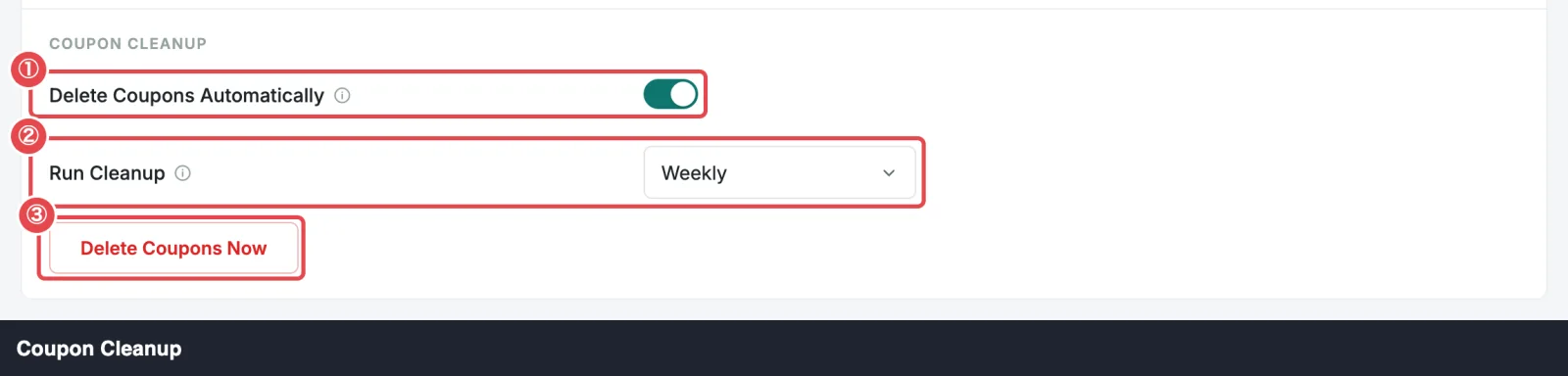
Delete Coupons Now
To clear things out straight away, click Delete Coupons Now in the same panel. ShapedRecover counts what qualifies and asks first:
Delete coupons? Delete 5 used and expired coupons? This cannot be undone.
Click Delete to go ahead, or Cancel to leave them. When it's done, you'll see "Used and expired coupons deleted". If there's nothing to delete, it says "No used or expired coupons to delete." and doesn't ask anything.
It deletes exactly what the automatic cleanup would: generated coupons that are expired, or used more than 7 days ago.
When you uninstall
If you delete the plugin with Delete Everything on Uninstall switched on (Settings → Data & Storage → Uninstall), every coupon ShapedRecover generated is removed, used or not. That includes live codes in emails shoppers haven't opened yet, so they'll stop working. Your own coupons stay.
With that switch off (the default), nothing is removed, and your generated coupons stay in WooCommerce. See Uninstalling & Data.
Where to go next
- Coupons in Emails: how generated coupons are made.
- Coupon Settings: every field in Settings → Coupons.
- Data & Storage: how long carts and send history are kept.